
C++ Core Programming
This stage offers a detailed treatment of C++ ==object-oriented== programming techniques, examining the core and essence of the language.
1 Memory Partition Model
When a C++ program runs, memory is broadly divided into 4 regions
- Code segment: holds the binary code of function bodies and is managed by the operating system
- Global segment: holds global variables, static variables, and constants
- Stack segment: automatically allocated and freed by the compiler; it stores function parameters, local variables, and the like
- Heap segment: allocated and freed by the programmer; if the programmer does not release it, the operating system reclaims it when the program ends
Significance of the four memory regions:
Data kept in different regions is assigned different lifetimes, affording us greater flexibility in programming
1.1 Before the Program Runs
Once the program is compiled, an executable exe file is produced. Before that program is executed, it is divided into two regions
Code segment:
It stores the machine instructions executed by the CPU
The code segment is shared; sharing means that for a frequently run program only a single copy of the code needs to reside in memory
The code segment is read-only, a restriction that keeps the program from accidentally altering its own instructions
Global segment:
Global variables and static variables are stored here.
The global segment also contains the constant area, where string literals and other constants reside.
==Data in this region is released by the operating system once the program ends==.
Example:
| |
Printed result:
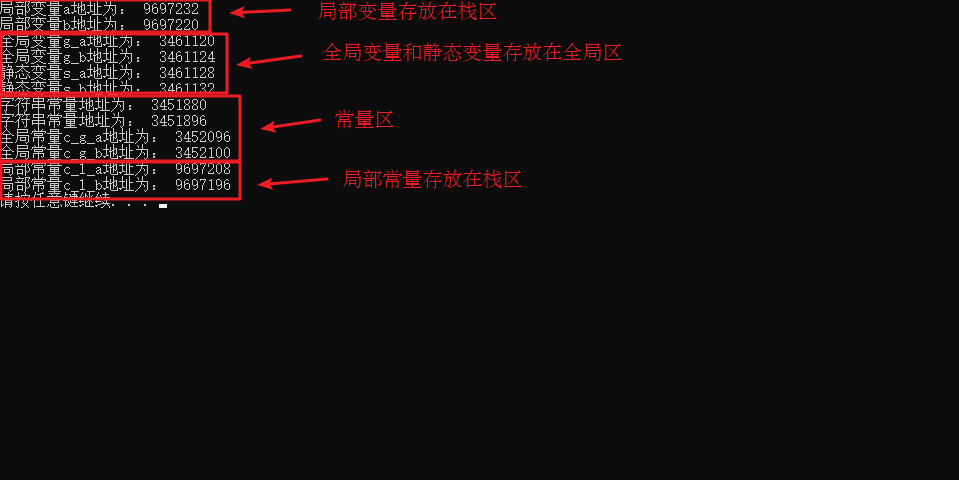
Summary:
- In C++, before a program runs, memory is split into a global segment and a code segment
- The code segment is shared and read-only
- The global segment holds global variables, static variables, and constants
- The constant area holds global constants qualified by const and string literals
1.2 After the Program Runs
Stack segment:
Automatically allocated and freed by the compiler, it stores function parameters, local variables, and so forth
Caution: never return the address of a local variable, since data allocated on the stack is released automatically by the compiler
Example:
| |
Heap segment:
Allocated and freed by the programmer; if the programmer does not release it, the operating system reclaims it when the program ends
In C++, memory is allocated on the heap chiefly through new
Example:
| |
Summary:
The programmer manages both the allocation and the release of heap data
Heap memory is allocated with the new keyword
1.3 The new Operator
C++ uses the ==new== operator to allocate data on the heap
Data created on the heap is allocated and freed manually by the programmer, with the ==delete== operator performing the release
Syntax: new data type
Data created with new returns a pointer to the corresponding data type
Example 1: Basic Syntax
| |
Example 2: Allocating an Array
| |
2 References
2.1 Basic Use of References
**Purpose: **to give a variable an alias
Syntax: data_type &alias = original_name
Example:
| |
2.2 Points to Note About References
- A reference must be initialized
- Once initialized, a reference cannot be changed
Example:
| |
2.3 References as Function Parameters
Purpose: when passing arguments to a function, references allow a parameter to modify the actual argument
Advantage: this simplifies modifying arguments with pointers
Example:
| |
Summary: a reference parameter produces the same effect as passing by address, although the syntax of references is clearer and simpler
2.4 References as Function Return Values
Purpose: a reference can serve as a function return value
Caution: never return a reference to a local variable
Usage: a function call may serve as an lvalue
Example:
| |
2.5 The Essence of References
Essence: internally in C++, a reference is implemented as a constant pointer.
Explanatory example:
| |
Conclusion: C++ favors references because their syntax is convenient; although a reference is essentially a constant pointer, the compiler performs all the pointer manipulations on our behalf
2.6 Const References
Purpose: const references chiefly qualify parameters, guarding against accidental modification
Within a function parameter list you can add ==const to qualify a parameter==, preventing that parameter from altering the argument
Example:
| |
3 Function Enhancements
3.1 Default Function Parameters
In C++, parameters in a function parameter list may have default values.
Syntax: return_type function_name (parameter = default_value) {}
Example:
| |
3.2 Placeholder Function Parameters
A C++ function parameter list may contain placeholder parameters that occupy a position which must be filled when the function is called
Syntax: return_type function_name(data_type){}
At this stage placeholder parameters have little practical significance, though later lessons will draw on this technique
Example:
| |
3.3 Function Overloading
3.3.1 Overview of Function Overloading
Purpose: functions may bear the same name, which improves reusability
Conditions for function overloading:
- Within the same scope
- The function names are identical
- The parameter types differ, or the number differs or the order differs
Note: a function return type cannot serve as a condition for overloading
Example:
| |
3.3.2 Points to Note About Function Overloading
- References as an overloading condition
- Function overloading meeting default parameters
Example:
| |
4 Classes and Objects
The three hallmarks of C++ object-oriented programming are ==encapsulation, inheritance, and polymorphism==
C++ treats ==all things as objects==, and each object has its own attributes and behaviors
For example:
A person can be treated as an object, with attributes such as name, age, height, and weight, and behaviors such as walking, running, jumping, eating, and singing…
A car can likewise be treated as an object, with attributes such as wheels, a steering wheel, and headlights, and behaviors such as carrying passengers, playing music, and running the air conditioner…
==Objects== sharing the same nature can be abstracted into a ==class==: a person belongs to the human class, and a car belongs to the car class
4.1 Encapsulation
4.1.1 The Significance of Encapsulation
Encapsulation is one of the three hallmarks of C++ object-oriented programming
The significance of encapsulation:
- It unites attributes and behaviors into a single entity representing things in life
- It subjects attributes and behaviors to access control
Significance of encapsulation, part one:
When designing a class, you write attributes and behaviors together to represent a thing
Syntax: class ClassName{ access: attributes / behaviors };
Example 1: design a Circle class that computes a circle circumference
Example code:
| |
Example 2: design a Student class whose attributes are a name and a student ID; it should allow assigning and displaying both
Example 2 code:
| |
Significance of encapsulation, part two:
While designing a class, you may place attributes and behaviors under different access levels so as to control them
There are three access levels:
- public public access
- protected protected access
- private private access
Example:
| |
4.1.2 Differences Between struct and class
In C++ the sole difference between struct and class lies in their different default access levels
The differences:
- struct defaults to public access
- class defaults to private access
| |
4.1.3 Making Member Attributes Private
Advantage 1: making every member attribute private lets you control read and write access yourself
Advantage 2: where write access is concerned, we can validate the data
Example:
| |
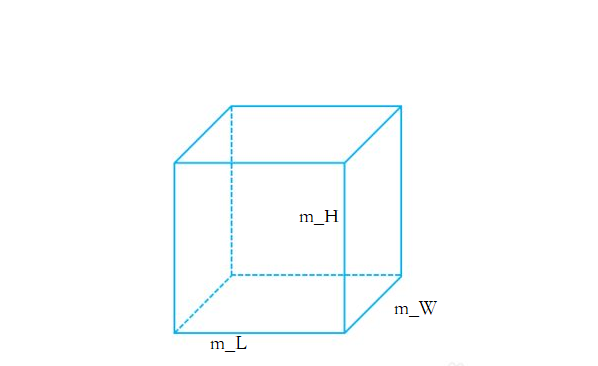
Exercise 1: Designing a Cube Class
Design a Cube class
Compute the surface area and volume of the cube
Use both a global function and a member function to determine whether two cubes are equal.
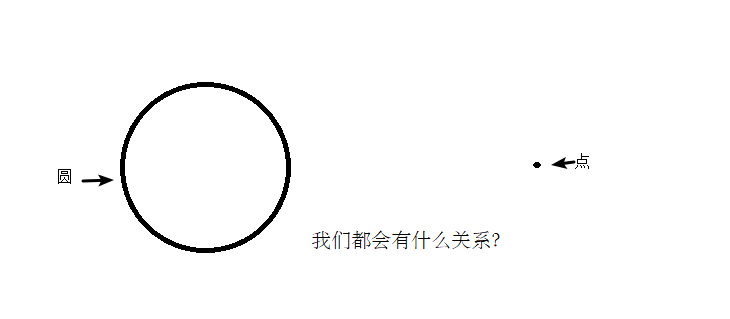
Exercise 2: The Relationship Between a Point and a Circle
Design a Circle class and a Point class, then compute the relationship between the point and the circle.
4.2 Object Initialization and Cleanup
- Electronic products we buy in daily life generally come with factory settings, and one day, when we no longer use them, we delete personal data to keep it safe
- Object-oriented programming in C++ comes from life: each object likewise has initial settings along with a data-cleanup step performed just before it is destroyed.
4.2.1 Constructors and Destructors
The initialization and cleanup of objects are two critically important safety concerns
Using an object or variable with no initial state has unpredictable consequences; equally, failing to clean up an object or variable promptly after use can create safety problems
C++ addresses these issues with constructors and destructors, which the compiler invokes automatically to carry out initialization and cleanup.
Object initialization and cleanup are tasks the compiler insists upon, so if we supply neither, the compiler will supply them
The constructor and destructor supplied by the compiler have empty implementations.
- Constructor: its main role is to assign values to an object’s member attributes at creation time; the compiler calls it automatically, so no manual call is needed.
- Destructor: the system calls it automatically just before an object is destroyed, to perform cleanup work.
Constructor syntax: ClassName(){}
- A constructor has no return value and does not write void
- Its name is identical to the class name
- A constructor may take parameters and can therefore be overloaded
- The constructor is called automatically when an object is created; no manual call is needed, and it runs only once
Destructor syntax: ~ClassName(){}
- A destructor has no return value and does not write void
- Its name matches the class name, prefixed by the symbol ~
- A destructor cannot take parameters and therefore cannot be overloaded
- The destructor is called automatically just before an object is destroyed; no manual call is needed, and it runs only once
| |
4.2.2 Classification and Invocation of Constructors
Two ways of classification:
- By parameters: parameterized and parameterless constructors
- By type: ordinary constructors and copy constructors
Three ways of invocation:
- Parentheses method
- Explicit method
- Implicit conversion method
Example:
| |
4.2.3 When Copy Constructors Are Called
In C++ a copy constructor is normally called in three situations
- initializing a new object from one that has already been created
- passing a value to a function parameter by value
- returning a local object by value
Example:
| |
4.2.4 Rules Governing Constructor Calls
By default, the C++ compiler adds at least three functions to a class
A default constructor (no parameters, empty body)
A default destructor (no parameters, empty body)
A default copy constructor that copies attributes by value
The rules governing constructor calls are these:
- If the user defines a parameterized constructor, C++ no longer provides a default parameterless one, although it still provides a default copy constructor
- If the user defines a copy constructor, C++ provides no other constructors
Example:
| |
4.2.5 Deep and Shallow Copies
Deep versus shallow copying is a classic interview question and a common pitfall
Shallow copy: a straightforward assignment-style copy
Deep copy: requesting fresh space on the heap and copying into it
Example:
| |
Summary: if an attribute is allocated on the heap, you must supply your own copy constructor to avoid the problems caused by shallow copying
4.2.6 Initialization Lists
Purpose:
C++ provides initialization-list syntax for initializing attributes
Syntax: Constructor(): attribute1(value1), attribute2(value2)... {}
Example:
| |
4.2.7 Class Objects as Class Members
A member of a C++ class may be an object of another class; such a member is called an object member
For example:
| |
Class B contains an object A as a member, so A is an object member
Now, when a B object is created, what is the order of construction and destruction for A and B?
Example:
| |
4.2.8 Static Members
Static members are member variables and member functions preceded by the keyword static
Static members fall into two categories:
- Static member variables
- All objects share the same piece of data
- Memory is allocated during compilation
- Declared inside the class, initialized outside it
- Static member functions
- All objects share the same function
- A static member function can access only static member variables
Example 1 : static member variables
| |
Example 2: static member functions
| |
4.3 The C++ Object Model and the this Pointer
4.3.1 Separate Storage of Member Variables and Member Functions
In C++, a class’s member variables and member functions are stored separately
Only non-static member variables belong to an object of the class
| |
4.3.2 The Concept of the this Pointer
Section 4.3.1 showed us that member variables and member functions are stored separately in C++
Each non-static member function gives rise to only one function instance, which means that several objects of the same type share a single piece of code
The question, then, is how that piece of code tells which object called it
C++ solves this by providing a special object pointer, the this pointer. The this pointer points to the object to which the called member function belongs
The this pointer is a pointer implicit within every non-static member function
There is no need to define the this pointer; simply use it
Uses of the this pointer:
- When a parameter and a member variable share a name, the this pointer distinguishes them
- To return the object itself from a non-static member function, use return *this
| |
4.3.3 Accessing Member Functions Through a Null Pointer
In C++ a member function may be called through a null pointer, but you must watch for use of the this pointer
If the this pointer is used, add a check to keep the code robust
Example:
| |
4.3.4 const-Qualified Member Functions
Constant functions:
- A member function followed by const is called a constant function
- A constant function cannot modify member attributes
- An attribute declared with the mutable keyword can still be changed inside a constant function
Constant objects:
- An object declared with const is called a constant object
- A constant object can call only constant functions
Example:
| |
4.4 Friends
In daily life your home has a living room (public) and your bedroom (private)
Every guest may enter the living room, but the bedroom is private, meaning that only you may go in
That said, you can also let your closest friends in.
In a program, when certain private attributes must be accessible to selected functions or classes outside the class, the friend mechanism comes into play
The point of a friend is to let a function or a class reach the private members of another class
The keyword for a friend is ==friend==
Three ways of implementing friends
- A global function as a friend
- A class as a friend
- A member function as a friend
4.4.1 A Global Function as a Friend
| |
4.4.2 A Class as a Friend
| |
4.4.3 A Member Function as a Friend
| |
4.5 Operator Overloading
Operator overloading means redefining an existing operator so that it takes on another function suited to different data types
4.5.1 Overloading the Plus Operator
Purpose: to enable addition of two user-defined data types
| |
Summary 1: the operators in expressions over built-in data types cannot be changed
Summary 2: do not abuse operator overloading
4.5.2 Overloading the Left-Shift Operator
Purpose: it makes output of user-defined data types possible
| |
Summary: overloading the left-shift operator together with friends makes it possible to output user-defined data types
4.5.3 Overloading the Increment Operator
Purpose: by overloading the increment operator you can implement your own integer-like data
| |
Summary: prefix increment returns a reference, whereas postfix increment returns a value
4.5.4 Overloading the Assignment Operator
The C++ compiler adds at least four functions to a class
- A default constructor (no parameters, empty body)
- A default destructor (no parameters, empty body)
- A default copy constructor that copies attributes by value
- The assignment operator operator=, which copies attributes by value
If a class has an attribute pointing into the heap, assignment operations can likewise give rise to deep/shallow copy problems
Example:
| |
4.5.5 Overloading Relational Operators
Purpose: overloading relational operators allows two objects of user-defined types to be compared
Example:
| |
4.5.6 Overloading the Function-Call Operator
- The function-call operator () may also be overloaded
- Because the overloaded form is used much like a function call, it is called a functor
- A functor has no fixed form and is extremely flexible
Example:
| |
4.6 Inheritance
Inheritance is one of the three hallmarks of object-oriented programming
Special relationships can exist between classes, as in the figure below:
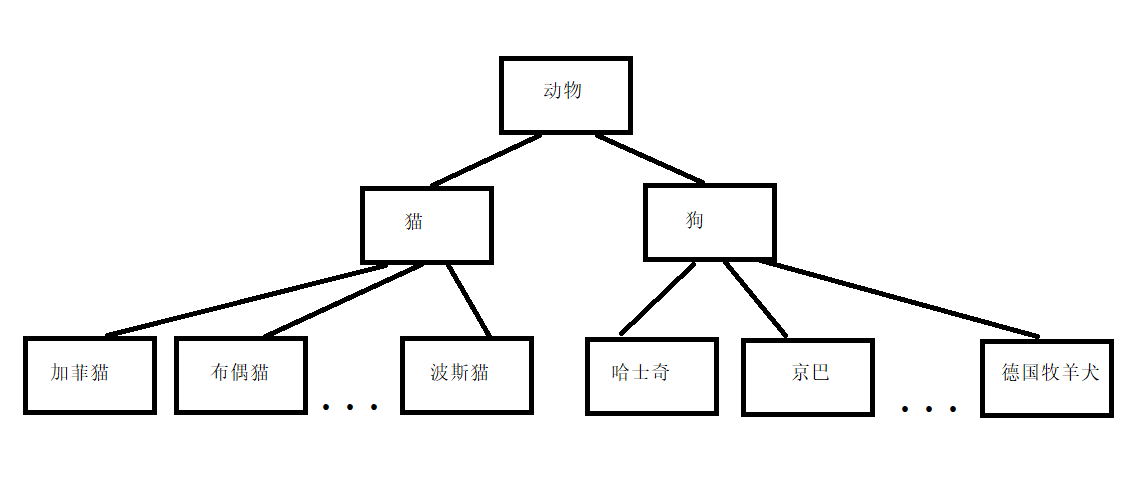
We see that when these classes are defined, lower-level members possess not only the traits of the level above but also features of their own.
At that point we can turn to inheritance in order to cut down on repeated code
4.6.1 Basic Syntax of Inheritance
Many websites, for instance, share a common header, a common footer, and even a common list on the left, differing only in their central content
Next we will implement a page first in the ordinary way and then by means of inheritance, so as to see the purpose and benefits of inheritance
Ordinary implementation:
| |
Inheritance-based implementation:
| |
Summary:
The benefit of inheritance: ==it can reduce duplicated code==
class A : public B;
Class A is called the child class or the derived class
Class B is called the parent class or the base class
The members of a derived class fall into two broad categories:
One category is inherited from the base class; the other consists of members the class adds for itself.
What comes down from the base class expresses commonality, whereas the newly added members express individuality.
4.6.2 Modes of Inheritance
Inheritance syntax: class Derived : inheritance_mode Base
There are three modes of inheritance:
- Public inheritance
- Protected inheritance
- Private inheritance
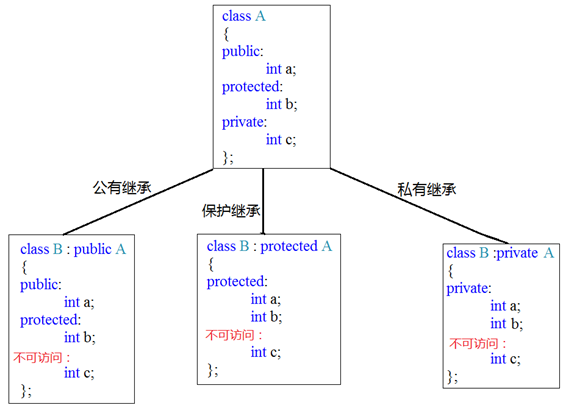
Example:
| |
4.6.3 The Object Model in Inheritance
Question: which members inherited from the parent class actually belong to the child object?
Example:
| |
Inspect it with a tool:

After opening the tool window, navigate to the drive holding the current CPP file
Then enter: cl /d1 reportSingleClassLayout
The result is shown below:
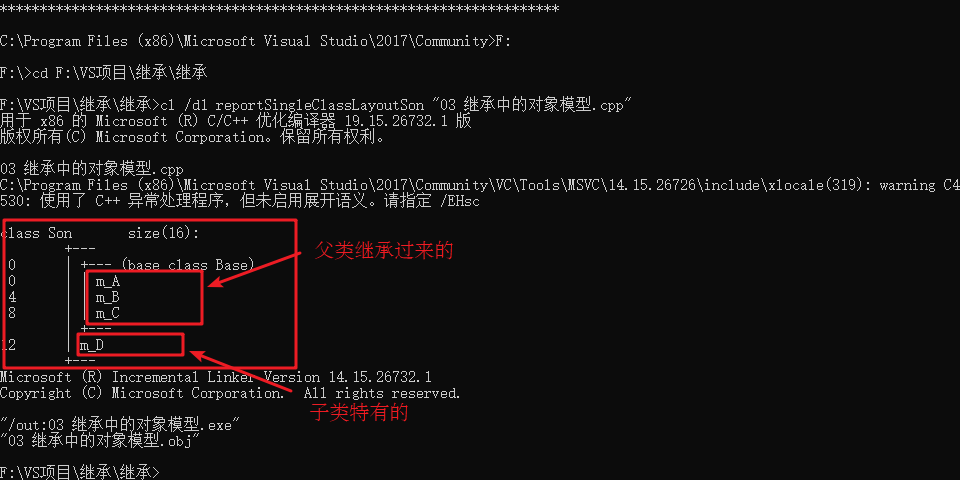
Conclusion: the private members of a parent class are inherited by the child as well; the compiler simply hides them, which makes them inaccessible
4.6.4 Construction and Destruction Order in Inheritance
Once a child class inherits from a parent, creating a child object also invokes the parent constructor
Question: which comes first, the parent or the child, in construction and destruction?
Example:
| |
Summary: under inheritance the parent constructor runs before the child constructor, while destruction follows the reverse order
4.6.5 Handling Same-Named Members in Inheritance
Question: when a child and a parent have members of the same name, how can a child object reach the same-named data in the child or in the parent?
- To access the child same-named member, simply access it directly
- To access the parent same-named member, add a scope qualifier
Example:
| |
Summary:
- A child object can access its own same-named member directly
- Adding a scope qualifier lets a child object access the parent same-named member
- When a child and a parent share a member-function name, the child hides the parent version; adding a scope qualifier reaches the parent function
4.6.6 Handling Same-Named Static Members in Inheritance
Question: how are same-named static members accessed through a child object under inheritance?
Static and non-static members with the same name are handled in the same way
- To access the child same-named member, simply access it directly
- To access the parent same-named member, add a scope qualifier
Example:
| |
Summary: same-named static members are handled just like non-static ones, except that two access routes exist (through an object and through the class name)
4.6.7 Syntax of Multiple Inheritance
C++ allows one class to inherit from several classes
Syntax: class Derived : inheritance_mode Base1 , inheritance_mode Base2...
Multiple inheritance may produce same-named members in the parent classes, which then need scope qualifiers to tell them apart
Multiple inheritance is not recommended in practical C++ development
Example:
| |
Summary: if parents in a multiple-inheritance hierarchy contain same-named members, the child must qualify them when using them
4.6.8 Diamond Inheritance
The concept of diamond inheritance:
Two derived classes inherit from the same base class
and another class in turn inherits from both of those derived classes
This pattern is known as diamond inheritance
A typical diamond-inheritance case:
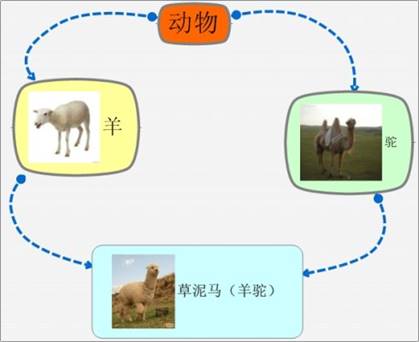
Problems with diamond inheritance:
- The sheep inherits the animal data, and the camel inherits it as well, so ambiguity arises when the alpaca uses that data.
- The alpaca inherits two copies of the animal data, although clearly a single copy would suffice.
Example:
| |
Summary:
- The chief problem with diamond inheritance is that the child inherits two copies of the same data, wasting resources to no purpose
- Virtual inheritance resolves the diamond-inheritance problem
4.7 Polymorphism
4.7.1 Basic Concepts of Polymorphism
Polymorphism is one of the three hallmarks of C++ object-oriented programming
Polymorphism falls into two categories
- Static polymorphism: function overloading and operator overloading belong here; they reuse a function name
- Dynamic polymorphism: derived classes and virtual functions deliver runtime polymorphism
The distinction between static and dynamic polymorphism:
- Static polymorphism binds addresses early - the function address is settled during compilation
- Dynamic polymorphism binds addresses late - the function address is settled during execution
The following case explains polymorphism
| |
Summary:
Conditions that polymorphism must satisfy
- An inheritance relationship exists
- The child class overrides a virtual function of the parent
Conditions for using polymorphism
- A parent pointer or reference points to a child object
Overriding: when the return type, function name, and parameter list match completely, it is called an override
4.7.2 Polymorphism Example 1 - Calculator Class
Case description:
Design a calculator class that operates on two operands, once with an ordinary implementation and once with polymorphism
Advantages of polymorphism:
- Clearly structured code
- Strong readability
- Easier extension and maintenance, both early and late
Example:
| |
Summary: C++ development encourages designing program architectures with polymorphism, given its many advantages
4.7.3 Pure Virtual Functions and Abstract Classes
Under polymorphism the implementation of a virtual function in the parent is generally meaningless, since what is actually called is the child override
You can therefore turn the virtual function into a pure virtual function
Pure virtual function syntax: virtual return_type function_name (parameter_list) = 0 ;
A class containing a pure virtual function is also called an ==abstract class==
Characteristics of abstract classes:
- They cannot be instantiated
- A child class must override the abstract-class pure virtual functions, or it becomes abstract too
Example:
| |
4.7.4 Polymorphism Example 2 - Making a Drink
Case description:
The general process of making a drink runs: boil water - steep - pour into the cup - add extras
Implement this case with polymorphism by providing an abstract drink-making base class plus child classes that make coffee and tea
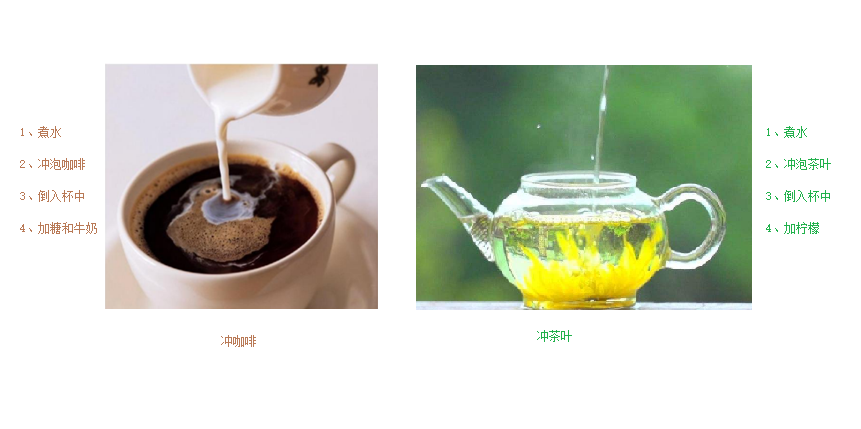
Example:
| |
4.7.5 Virtual and Pure Virtual Destructors
When polymorphism is used and a child class contains an attribute allocated on the heap, releasing through a parent pointer fails to invoke the child destructor
The remedy: turn the parent destructor into a virtual destructor or a pure virtual destructor
What virtual and pure virtual destructors share:
- Both allow a parent pointer to release a child object properly
- Both require a concrete function implementation
How they differ:
- A pure virtual destructor makes its class abstract, so the class cannot be instantiated
Syntax of a virtual destructor:
virtual ~ClassName(){}
Syntax of a pure virtual destructor:
virtual ~ClassName() = 0;
ClassName::~ClassName(){}
Example:
| |
Summary:
- Virtual or pure virtual destructors exist to release child objects through a parent pointer
- If the child has no heap data, the destructor need not be virtual or pure virtual
- A class with a pure virtual destructor is abstract as well
4.7.6 Polymorphism Example 3 - Assembling a Computer
Case description:
The main components of a computer are the CPU (for computation), the video card (for display), and the memory module (for storage)
Wrap each component in an abstract base class, and have different vendors produce different components, say Intel and Lenovo
Create a Computer class with a function that makes the machine work, calling the working interface of every component
For testing, assemble three different computers and set them to work
Example:
| |
5 File Operations
Data generated while a program runs is temporary and is released once the program ends
Files, by contrast, let data persist
File operations in C++ require including the header ==< fstream >==
There are two kinds of file:
- Text file - the file is stored in the computer in ASCII form
- Binary file - the file is stored in the computer in binary form, which users normally cannot read directly
Three classes handle file operations:
- ofstream: writing
- ifstream: reading
- fstream : reading and writing
5.1 Text Files
5.1.1 Writing Files
The steps for writing a file are as follows:
Include the header file
#include <fstream>
Create a stream object
ofstream ofs;
Open the file
ofs.open(“file_path”, open_mode);
Write the data
ofs « “data to write”;
Close the file
ofs.close();
File opening modes:
| Mode | Explanation |
|---|---|
| ios::in | Open a file for reading |
| ios::out | Open a file for writing |
| ios::ate | Initial position: end of file |
| ios::app | Write to the file in append mode |
| ios::trunc | Delete the file if it exists, then create it |
| ios::binary | Binary mode |
Note: file opening modes can be combined using the | operator
For example: to write a file in binary mode, use ios::binary | ios:: out
Example:
| |
Summary:
- File operations require the header file fstream
- Reading a file can make use of ofstream, or of the fstream class
- When opening a file you must specify the path of the file and the opening mode
- Use « to write data into a file
- Close the file once the operation is finished
5.1.2 Reading Files
Reading a file resembles writing one, although there are relatively more ways to read
The steps for reading a file are as follows:
Include the header file
#include <fstream>
Create a stream object
ifstream ifs;
Open the file and check whether the open succeeded
ifs.open(“file_path”, open_mode);
Read the data
Four ways of reading
Close the file
ifs.close();
Example:
| |
Summary:
- Reading a file can make use of ifstream, or of the fstream class
- The is_open function tells you whether the file opened successfully
- close closes the file
5.2 Binary Files
Read from and write to files in binary mode
The opening mode must be set to ==ios::binary==
5.2.1 Writing Files
Writing a file in binary mode chiefly relies on the stream object calling its write member function
Function prototype: ostream& write(const char * buffer,int len);
Parameter explanation: the character pointer buffer points to a stretch of memory; len is the number of bytes to read or write
Example:
| |
Summary:
- A file output stream object can write data in binary mode through the write function
5.2.2 Reading Files
Reading a file in binary mode chiefly relies on the stream object calling its read member function
Function prototype: istream& read(char *buffer,int len);
Parameter explanation: the character pointer buffer points to a stretch of memory; len is the number of bytes to read or write
Example:
| |
- A file input stream object can read data in binary mode through the read function