
C++ Generic Programming
- This stage offers a detailed explanation of C++ ==generic programming== and ==STL== techniques, delving into more advanced uses of C++
1 Templates
1.1 The Concept of Templates
A template is used to build a universal mold, greatly enhancing reusability.
Consider templates in everyday life.
A one-inch photo template:

A PPT template:


Characteristics of templates:
- A template cannot be used directly; it is merely a framework.
- The generality of a template is not all-powerful.
1.2 Function Templates
- Another programming paradigm in C++ is known as ==generic programming==, and the technique it chiefly relies on is the template.
- C++ offers two template mechanisms: function templates and class templates.
1.2.1 Function Template Syntax
The purpose of a function template:
To create a general function whose return type and parameter types need not be specified concretely, but are instead represented by a fictitious type.
Syntax:
| |
Explanation:
template — declares the creation of a template
typename — indicates that the symbol following it is a data type; it may be replaced by class
T — a generic data type; the name can be replaced and is usually an uppercase letter
Example:
| |
Summary:
- Function templates make use of the keyword template.
- There are two ways to use a function template: automatic type deduction and explicit type specification.
- The aim of templates is to improve reusability by parameterizing types.
1.2.2 Points to Note About Function Templates
Points to note:
- With automatic type deduction, T must resolve to a consistent data type before the template can be used.
- The data type of T must be determined before a template can be used.
Example:
| |
Summary:
- When using a template, the generic data type T must be established, and a consistent type must be deducible.
1.2.3 A Function Template Case Study
Case description:
- Use a function template to encapsulate a sorting function capable of sorting arrays of different data types.
- The sorting rule goes from largest to smallest, and the algorithm employed is selection sort.
- Test separately with a char array and an int array.
Example:
| |
Summary: Templates can improve code reuse and should be mastered thoroughly.
1.2.4 Differences Between Ordinary Functions and Function Templates
Differences between ordinary functions and function templates:
- When an ordinary function is called, automatic type conversion (implicit type conversion) may take place.
- When a function template is called using automatic type deduction, no implicit type conversion takes place.
- If explicit type specification is used, implicit type conversion may take place.
Example:
| |
Summary: It is advisable to call function templates using explicit type specification, since that lets you determine the generic type T yourself.
1.2.5 Calling Rules for Ordinary Functions and Function Templates
The calling rules are as follows:
- When both a function template and an ordinary function can do the job, the ordinary function is preferred.
- A function template can be forced by supplying an empty template argument list.
- Function templates may also be overloaded.
- When a function template yields a better match, it is called in preference.
Example:
| |
Summary: Since function templates are available, it is best to avoid providing an ordinary function as well, for ambiguity may easily arise.
1.2.6 Limitations of Templates
Limitations:
- The generality of templates is not omnipotent.
For example:
| |
In the code above, the assignment operation cannot be carried out if the arguments a and b are arrays.
Another example:
| |
Here too, if T is a user-defined data type such as Person, the code will not run correctly.
To address such problems, C++ supplies template overloading, which can provide specialized templates for these specific types.
Example:
| |
Summary:
- Specialized templates can resolve the generalization of user-defined types.
- The point of learning templates is less about writing them yourself and more about applying the templates supplied by the STL.
1.3 Class Templates
1.3.1 Class Template Syntax
The purpose of a class template:
- To create a general class whose member data types need not be specified concretely, but are represented by a fictitious type.
Syntax:
| |
Explanation:
template — declares the creation of a template
typename — indicates that the symbol following it is a data type; it may be replaced by class
T — a generic data type; the name can be replaced and is usually an uppercase letter
Example:
| |
Summary: Class template syntax resembles that of function templates; simply add a class after template in the declaration, and the result is a class template.
1.3.2 Differences Between Class Templates and Function Templates
There are two main differences between class templates and function templates:
- Class templates have no form of automatic type deduction.
- Class templates may have default parameters in the template parameter list.
Example:
| |
Summary:
- Class templates must be used with explicit type specification.
- The template parameter list of a class template may contain default parameters.
1.3.3 When Member Functions in a Class Template Are Created
The creation timing of member functions in a class template differs from that of member functions in an ordinary class:
- Member functions of an ordinary class can be created from the start.
- Member functions of a class template are created only when they are called.
Example:
| |
Summary: Member functions in a class template are not created at the outset; they are created only when called.
1.3.4 Class Template Objects as Function Parameters
Learning objective:
- The ways of passing an object instantiated from a class template to a function.
There are three ways of passing such an object:
- Specify the type being passed — state the object’s data type explicitly.
- Template the parameters — turn the object’s parameters into templates for passing.
- Template the whole class — template the object’s type as a whole for passing.
Example:
| |
Summary:
- An object created from a class template can be passed to a function in three ways.
- The most widely used is the first: specifying the type being passed.
1.3.5 Class Templates and Inheritance
When a class template encounters inheritance, keep the following points in mind:
- When a derived class inherits from a parent that is a class template, the derived class must specify the type of T in the parent at the point of declaration.
- If it does not, the compiler cannot allocate memory for the derived class.
- To specify the type of T in the parent flexibly, the derived class must itself become a class template.
Example:
| |
Summary: If the parent class is a class template, the derived class must specify the data type of T in the parent.
1.3.6 Out-of-Class Implementation of Class Template Member Functions
Learning objective: to master the out-of-class implementation of member functions in a class template.
Example:
| |
Summary: When implementing member functions of a class template outside the class, the template parameter list must be included.
1.3.7 Writing Class Templates Across Multiple Files
Learning objective:
- Understand the problems that arise when the member functions of a class template are written in separate files, and how to solve them.
The problem:
- Because member functions of a class template are created at the point of call, they cannot be linked when the code is split across files.
The solutions:
- Solution 1: include the .cpp source file directly.
- Solution 2: put the declaration and implementation in the same file and change the extension to .hpp; hpp is a conventional name, not a mandatory one.
Example:
Code in person.hpp:
| |
Code in class template split into files.cpp:
| |
Summary: The prevailing solution is the second one—write the class template’s member functions together and change the extension to .hpp.
1.3.8 Class Templates and Friends
Learning objective:
- Master the in-class and out-of-class implementations of friend functions used with class templates.
Global function implemented inside the class — simply declare the friend within the class.
Global function implemented outside the class — the compiler must be made aware of the global function’s existence in advance.
Example:
| |
Summary: It is recommended to implement global functions inside the class, since the approach is simple and the compiler can recognize it directly.
1.3.9 A Class Template Case Study
Case description: implement a generic array class with the following requirements:
- It can store data of built-in as well as user-defined types.
- The array’s data is stored on the heap.
- The array’s capacity can be passed to the constructor.
- Provide a corresponding copy constructor and operator= to prevent shallow-copy problems.
- Provide append-at-end and delete-at-end methods for adding and removing array data.
- Elements can be accessed by subscript.
- The current number of elements and the array’s capacity can be retrieved.
Example:
Code in myArray.hpp:
| |
In the class template case - array class encapsulation.cpp:
| |
Summary:
You can use what you have learned to implement a generic array.
2 A First Look at the STL
2.1 The Birth of the STL
- For a long time, the software community has wanted to create something reusable.
- The object-oriented and generic programming ideas in C++ aim at improving reusability.
- More often than not, data structures and algorithms lacked a common standard, forcing people into a great deal of repetitive work.
- To establish a standard for data structures and algorithms, the STL came into being.
2.2 Basic STL Concepts
- STL (Standard Template Library, standard template library)
- Broadly speaking, the STL is divided into: containers, algorithms, and iterators.
- Containers and algorithms are seamlessly connected through iterators.
- Almost all STL code takes the form of template classes or template functions.
2.3 The Six Components of the STL
The STL is broadly divided into six components: containers, algorithms, iterators, functors, adapters, and allocators.
- Containers: the various data structures—such as vector, list, deque, set, and map—used to store data.
- Algorithms: the various common algorithms, such as sort, find, copy, and for_each.
- Iterators: these act as the glue between containers and algorithms.
- Functors: entities that behave like functions and can serve as a strategy for an algorithm.
- Adapters: things used to modify the interface of a container, functor, or iterator.
- Allocators: responsible for the allocation and management of memory space.
2.4 Containers, Algorithms, and Iterators in the STL
Container: a place to put things.
An STL container is an implementation of the most widely used data structures.
Common data structures include arrays, linked lists, trees, stacks, queues, sets, and maps.
These containers fall into two categories: sequence containers and associative containers.
Sequence containers emphasize the ordering of values; every element in a sequence container has a fixed position. Associative containers are binary-tree structures in which elements have no strict physical ordering relative to one another.
Algorithm: a solution to a problem.
A finite sequence of steps that resolves a logical or mathematical problem is what we call an algorithm.
Algorithms are divided into mutating algorithms and non-mutating algorithms.
A mutating algorithm changes the contents of the elements in a range during the operation—copying, replacing, deleting, and so on.
A non-mutating algorithm leaves the contents of the elements unchanged during the operation—searching, counting, traversing, finding extrema, and so on.
Iterator: the glue between containers and algorithms.
It provides a way to visit the elements of a container in sequence without exposing the container’s internal representation.
Every container has its own dedicated iterator.
Using an iterator is very much like using a pointer; at the outset, you can simply think of an iterator as a pointer.
Iterator categories:
| Category | Function | Supported Operations |
|---|---|---|
| Input iterator | Read-only access to data | Read-only; supports ++, ==, != |
| Output iterator | Write-only access to data | Write-only; supports ++ |
| Forward iterator | Read and write operations, able to advance the iterator | Read/write; supports ++, ==, != |
| Bidirectional iterator | Read/write operations, able to move forward and backward | Read/write; supports ++, – |
| Random-access iterator | Read/write operations, able to access any element by jumping; the most powerful iterator | Read/write; supports ++, –, [n], -n, <, <=, >, >= |
The iterator types most commonly used in containers are the bidirectional iterator and the random-access iterator.
2.5 A First Look at Container, Algorithm, and Iterator
Having learned the concepts of container, algorithm, and iterator in the STL, let us experience the charm of the STL through code.
The most commonly used container in the STL is vector, which can be understood as an array. Below we will learn how to insert data into this container and traverse it.
2.5.1 Storing Built-in Data Types in a vector
Container: vector
Algorithm: for_each
Iterator: vector<int>::iterator
Example:
| |
2.5.2 Storing User-defined Data Types in a vector
Learning objective: store user-defined data types in a vector and print them.
Example:
| |
2.5.3 Containers Nested Inside Containers
Learning objective: nest containers within containers and traverse all the data for output.
Example:
| |
3 STL — Commonly Used Containers
3.1 The string Container
3.1.1 Basic string Concepts
Essence:
- A string is a C++-style character string, and in essence a string is a class.
The difference between string and char *:
- char * is a pointer.
- string is a class; internally it encapsulates char* and manages the string, making it a container of type char*.
Characteristics:
The string class encapsulates many member methods internally.
For example: find for searching, copy for copying, delete for deletion, replace for replacement, and insert for insertion.
string manages the memory allocated by char*, so you need not worry about out-of-bounds copying or value access; the class handles these internally.
3.1.2 string Constructors
Constructor prototypes:
string();//creates an empty string, e.g. string str;string(const char* s);//initializes with the string sstring(const string& str);//initializes one string object with anotherstring(int n, char c);//initializes with n copies of the character c
Example:
| |
Summary: The various ways of constructing a string are not directly comparable; just use whichever suits the situation.
3.1.3 string Assignment
Function description:
- Assign a value to a string.
Assignment function prototypes:
string& operator=(const char* s);//assign a char* string to the current stringstring& operator=(const string &s);//assign string s to the current stringstring& operator=(char c);//assign a character to the current stringstring& assign(const char *s);//assign string s to the current stringstring& assign(const char *s, int n);//assign the first n characters of s to the current stringstring& assign(const string &s);//assign string s to the current stringstring& assign(int n, char c);//assign n copies of character c to the current string
Example:
| |
Summary:
There are many ways to assign to a string; operator= is the most practical of them.
3.1.4 string Concatenation
Function description:
- Append one string to the end of another.
Function prototypes:
string& operator+=(const char* str);//overloads the += operatorstring& operator+=(const char c);//overloads the += operatorstring& operator+=(const string& str);//overloads the += operatorstring& append(const char *s);//append string s to the end of the current stringstring& append(const char *s, int n);//append the first n characters of s to the end of the current stringstring& append(const string &s);//same as operator+=(const string& str)string& append(const string &s, int pos, int n);//append n characters of s starting at pos to the end of the string
Example:
| |
Summary: There are many overloaded versions of string concatenation; at the learning stage, just remember a few.
3.1.5 string Finding and Replacing
Function description:
- Finding: determine whether a specified string exists.
- Replacing: replace a string at a specified position.
Function prototypes:
int find(const string& str, int pos = 0) const;//find the first occurrence of str, starting from posint find(const char* s, int pos = 0) const;//find the first occurrence of s, starting from posint find(const char* s, int pos, int n) const;//starting from pos, find the first occurrence of the first n characters of sint find(const char c, int pos = 0) const;//find the first occurrence of character cint rfind(const string& str, int pos = npos) const;//find the last occurrence of str, starting from posint rfind(const char* s, int pos = npos) const;//find the last occurrence of s, starting from posint rfind(const char* s, int pos, int n) const;//from pos, find the last occurrence of the first n characters of sint rfind(const char c, int pos = 0) const;//find the last occurrence of character cstring& replace(int pos, int n, const string& str);//replace n characters starting at pos with string strstring& replace(int pos, int n,const char* s);//replace n characters starting at pos with string s
Example:
| |
Summary:
- find searches from left to right, whereas rfind searches from right to left.
- Once find locates a string it returns the position of its first character; if not found it returns -1.
- When replacing, replace requires the starting position, the number of characters, and the replacement string.
3.1.6 string Comparison
Function description:
- Compare one string with another.
Comparison method:
- Strings are compared character by character according to their ASCII codes.
= returns 0
> returns 1
< returns -1
Function prototypes:
int compare(const string &s) const;//compare with string sint compare(const char *s) const;//compare with string s
Example:
| |
Summary: String comparison is mainly used to test two strings for equality; determining which is larger or smaller is of little practical significance.
3.1.7 Accessing Individual Characters in a string
There are two ways to access a single character in a string:
char& operator[](int n);//access a character with [ ]char& at(int n);//access a character with the at method
Example:
| |
Summary: A single character in a string can be accessed in two ways—with [ ] or with at.
3.1.8 Inserting and Deleting in a string
Function description:
- Insert and delete characters in a string.
Function prototypes:
string& insert(int pos, const char* s);//insert a stringstring& insert(int pos, const string& str);//insert a stringstring& insert(int pos, int n, char c);//insert n copies of character c at the specified positionstring& erase(int pos, int n = npos);//delete n characters starting at pos
Example:
| |
Summary: The starting index for both insertion and deletion is 0.
3.1.9 string Substrings
Function description:
- Obtain a desired substring from a string.
Function prototype:
string substr(int pos = 0, int n = npos) const;//return a string consisting of n characters starting at pos
Example:
| |
Summary: Used skillfully, the substring facility can extract useful information in real development work.
3.2 The vector Container
3.2.1 Basic vector Concepts
Function:
- The vector data structure is very similar to an array; it is also called a single-ended array.
The difference between vector and an ordinary array:
- The difference is that an array occupies static space, whereas a vector can expand dynamically.
Dynamic expansion:
- Rather than appending new space after the original storage, it finds a larger block of memory, copies the original data into the new space, and releases the old space.
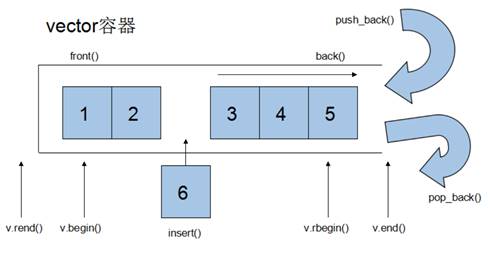
- The iterator of a vector container is a random-access iterator.
3.2.2 vector Constructors
Function description:
- Create a vector container.
Function prototypes:
vector<T> v;//implemented as a template class; the default constructorvector(v.begin(), v.end());//copy the elements in the range [begin(), end()) into the containervector(n, elem);//constructor copying n copies of elem into the containervector(const vector &vec);//copy constructor
Example:
| |
Summary: The various ways of constructing a vector are not directly comparable; just use whichever suits the situation.
3.2.3 vector Assignment
Function description:
- Assign values to a vector container.
Function prototypes:
vector& operator=(const vector &vec);//overload the assignment operatorassign(beg, end);//copy-assign the data in the range [beg, end) into the containerassign(n, elem);//copy-assign n copies of elem into the container
Example:
| |
Summary: vector assignment is quite simple; either operator= or assign will do.
3.2.4 vector Capacity and Size
Function description:
- Operate on the capacity and size of a vector container.
Function prototypes:
empty();//determine whether the container is emptycapacity();//the container’s capacitysize();//return the number of elements in the containerresize(int num);//reset the container’s length to num; if it grows, new positions are filled with default values.// If the container shrinks, the elements beyond the new length are removed.resize(int num, elem);//reset the container’s length to num; if it grows, new positions are filled with the value elem.// If the container shrinks, the elements beyond the new length are removed
Example:
| |
Summary:
- Test whether empty — empty
- Return the element count — size
- Return the container’s capacity — capacity
- Reset the size — resize
3.2.5 vector Insertion and Deletion
Function description:
- Insert into and delete from a vector container.
Function prototypes:
push_back(ele);//append element ele at the endpop_back();//delete the last elementinsert(const_iterator pos, ele);//insert element ele at the position pos indicated by the iteratorinsert(const_iterator pos, int count,ele);//insert count copies of ele at the position pos indicated by the iteratorerase(const_iterator pos);//delete the element indicated by the iteratorerase(const_iterator start, const_iterator end);//delete the elements between start and end indicated by the iteratorsclear();//delete all elements in the container
Example:
| |
Summary:
- Append at end — push_back
- Delete at end — pop_back
- Insert — insert (position iterator)
- Delete — erase (position iterator)
- Clear — clear
3.2.6 vector Data Access
Function description:
- Access data in a vector.
Function prototypes:
at(int idx);//return the data at index idxoperator[];//return the data at index idxfront();//return the first data element in the containerback();//return the last data element in the container
Example:
| |
Summary:
- Besides using iterators to access vector elements, [ ] and at are also available.
- front returns the container’s first element.
- back returns the container’s last element.
3.2.7 Swapping vector Containers
Function description:
- Swap the elements of two containers.
Function prototype:
swap(vec);// swap the elements of vec with those of the current container
Example:
| |
Summary: swap can swap two containers and can also achieve a practical memory-shrinking effect.
3.2.8 vector Reserved Space
Function description:
- Reduce the number of expansions when a vector grows dynamically.
Function prototype:
reserve(int len);//reserve space for len elements; reserved positions are not initialized and their elements are inaccessible.
Example:
| |
Summary: When the data volume is large, you can use reserve to set aside space at the outset.
3.3 The deque Container
3.3.1 Basic deque Concepts
Function:
- A double-ended array that supports insertion and deletion at the front end.
The difference between deque and vector:
- vector is inefficient at inserting and deleting at the front, and the larger the data set, the lower the efficiency.
- deque, by comparison, inserts and deletes at the front faster than vector.
- vector accesses elements faster than deque, a consequence of their different internal implementations.
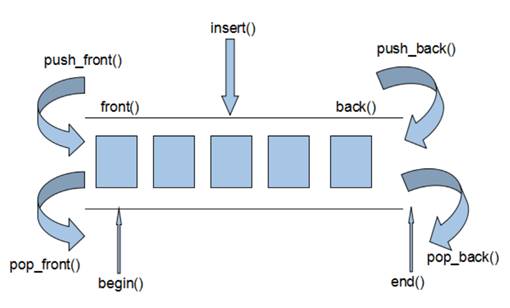
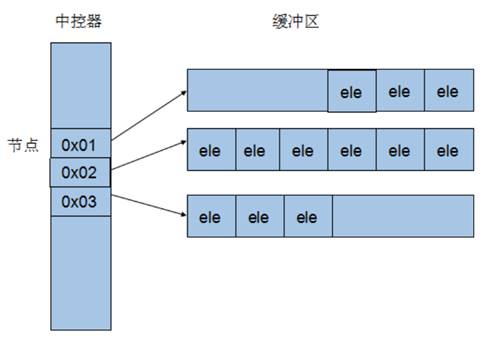
How deque works internally:
Inside a deque there is a central controller that maintains the contents of each buffer, and the buffers hold the actual data.
What the central controller maintains is the address of each buffer, so that using a deque feels like using a single contiguous block of memory.
- The iterator of a deque container also supports random access.
3.3.2 deque Constructors
Function description:
- Construct a deque container.
Function prototypes:
deque<T>deqT; //default construction formdeque(beg, end);//constructor copying the elements in the range [beg, end) into the containerdeque(n, elem);//constructor copying n copies of elem into the containerdeque(const deque &deq);//copy constructor
Example:
| |
Summary: deque and vector containers are constructed in almost exactly the same way; just use whichever suits the situation.
3.3.3 deque Assignment
Function description:
- Assign values to a deque container.
Function prototypes:
deque& operator=(const deque &deq);//overload the assignment operatorassign(beg, end);//copy-assign the data in the range [beg, end) into the containerassign(n, elem);//copy-assign n copies of elem into the container
Example:
| |
Summary: deque assignment is also identical to vector’s; it should be mastered thoroughly.
3.3.4 deque Size Operations
Function description:
- Operate on the size of a deque container.
Function prototypes:
deque.empty();//determine whether the container is emptydeque.size();//return the number of elements in the containerdeque.resize(num);//reset the container’s length to num; if it grows, new positions are filled with default values.// If the container shrinks, the elements beyond the new length are removed.deque.resize(num, elem);//reset the container’s length to num; if it grows, new positions are filled with the value elem.// If the container shrinks, the elements beyond the new length are removed.
Example:
| |
Summary:
- deque has no notion of capacity.
- Test whether empty — empty
- Return the element count — size
- Reset the count — resize
3.3.5 deque Insertion and Deletion
Function description:
- Insert data into and delete data from a deque container.
Function prototypes:
Insertion at either end:
push_back(elem);//add a data item at the end of the containerpush_front(elem);//insert a data item at the front of the containerpop_back();//delete the container’s last data itempop_front();//delete the container’s first data item
Insertion at a specified position:
insert(pos,elem);//insert a copy of elem at position pos and return the location of the new datainsert(pos,n,elem);//insert n copies of elem at position pos; no return valueinsert(pos,beg,end);//insert the data in the range [beg,end) at position pos; no return valueclear();//clear all data in the containererase(beg,end);//delete the data in the range [beg,end) and return the location of the next itemerase(pos);//delete the data at position pos and return the location of the next item
Example:
| |
Summary:
- The positions supplied for insertion and deletion are iterators!
- Append at end — push_back
- Delete at end — pop_back
- Insert at front — push_front
- Delete at front — pop_front
3.3.6 deque Data Access
Function description:
- Access data in a deque.
Function prototypes:
at(int idx);//return the data at index idxoperator[];//return the data at index idxfront();//return the first data element in the containerback();//return the last data element in the container
Example:
| |
Summary:
- Besides using iterators to access deque elements, [ ] and at are also available.
- front returns the container’s first element.
- back returns the container’s last element.
3.3.7 Sorting a deque
Function description:
- Use an algorithm to sort a deque container.
Algorithm:
sort(iterator beg, iterator end)//sort the elements in the range from beg to end
Example:
| |
Summary: The sort algorithm is very practical; just include the algorithm header when using it.
3.4 Case Study — Judges’ Scoring
3.4.1 Case Description
There are five contestants, A through E, and ten judges who each score every contestant. Remove the highest score and the lowest score from the judges, then take the average.
3.4.2 Implementation Steps
- Create five contestants and place them in a vector.
- Traverse the vector, fetch each contestant in turn, and run a for loop that stores the ten scores in a deque container.
- Use the sort algorithm to order the scores in the deque, then remove the highest and lowest.
- Traverse the deque once and accumulate the total score.
- Obtain the average score.
Example code:
| |
Summary: Choosing different containers for the data can improve the efficiency of your code.
3.5 The stack Container
3.5.1 Basic stack Concepts
Concept: A stack is a first-in, last-out (First In Last Out, FILO) data structure with only one exit.
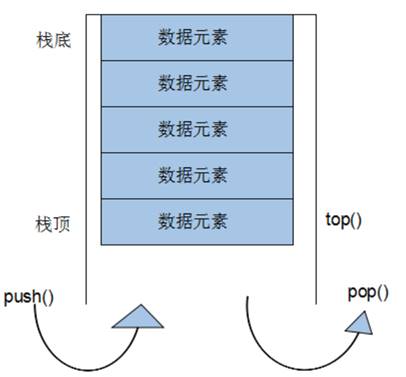
Only the element at the top of the stack can be used by the outside world, so a stack does not allow traversal.
Putting data into a stack is called — pushing push.
Taking data out of a stack is called — popping pop.
Stacks in everyday life:


3.5.2 Common stack Interfaces
Function description: the interfaces commonly exposed by the stack container.
Constructors:
stack<T> stk;//stack is implemented as a template class; the default form for constructing a stack objectstack(const stack &stk);//copy constructor
Assignment:
stack& operator=(const stack &stk);//overload the assignment operator
Data access:
push(elem);//add an element to the top of the stackpop();//remove the first element from the top of the stacktop();//return the element at the top of the stack
Size operations:
empty();//determine whether the stack is emptysize();//return the size of the stack
Example:
| |
Summary:
- Push — push
- Pop — pop
- Return the top — top
- Test whether empty — empty
- Return the stack size — size
3.6 The queue Container
3.6.1 Basic queue Concepts
Concept: Queue is a first-in, first-out (First In First Out, FIFO) data structure with two exits.
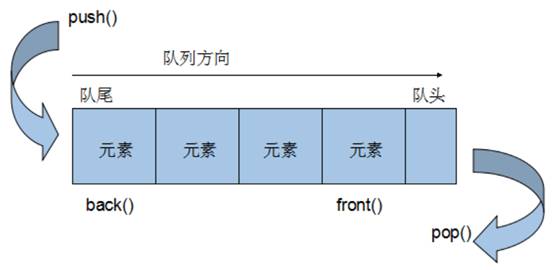
A queue container permits adding elements at one end and removing them at the other.
Only the head and the tail of a queue can be used by the outside world, so a queue does not allow traversal.
Putting data into a queue is called — enqueue push.
Taking data out of a queue is called — dequeue pop.
Queues in everyday life:

3.6.2 Common queue Interfaces
Function description: the interfaces commonly exposed by the stack container.
Constructors:
queue<T> que;//queue is implemented as a template class; the default form for constructing a queue objectqueue(const queue &que);//copy constructor
Assignment:
queue& operator=(const queue &que);//overload the assignment operator
Data access:
push(elem);//add an element at the tail of the queuepop();//remove the first element from the head of the queueback();//return the last elementfront();//return the first element
Size operations:
empty();//determine whether the stack is emptysize();//return the size of the stack
Example:
| |
Summary:
- Enqueue — push
- Dequeue — pop
- Return the head element — front
- Return the tail element — back
- Test whether the queue is empty — empty
- Return the queue size — size
3.7 The list Container
3.7.1 Basic list Concepts
Function: store data in linked fashion.
A linked list (list) is a storage structure whose physical units are non-contiguous; the logical order of the data elements is realized through the links of pointers in the list.
A list consists of a series of nodes.
A node consists of a data field, which stores the data element, and a pointer field, which stores the address of the next node.
The list in the STL is a doubly linked circular list.
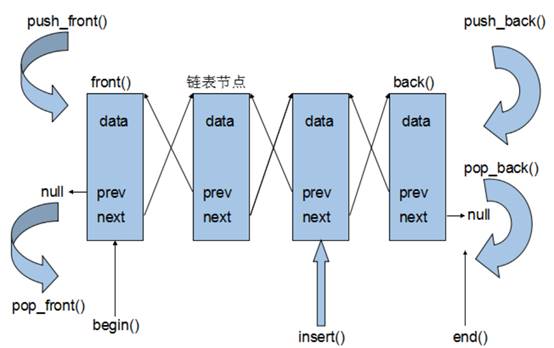
Because a list’s storage is not a contiguous block of memory, its iterators support only forward and backward movement; they are bidirectional iterators.
Advantages of list:
- It uses dynamic memory allocation, so it causes no memory waste or overflow.
- Insertion and deletion are very convenient—just modify pointers, with no need to move large numbers of elements.
Disadvantages of list:
- Although a list is flexible, it pays a considerable extra cost in space (the pointer fields) and time (traversal).
An important property of list is that insertions and deletions never invalidate existing list iterators, which does not hold for vector.
Summary: In the STL, list and vector are the two most commonly used containers, each with its own strengths and weaknesses.
3.7.2 list Constructors
Function description:
- Create a list container.
Function prototypes:
list<T> lst;//list is implemented as a template class; the default form for constructing an objectlist(beg,end);//constructor copying the elements in the range [beg, end) into the containerlist(n,elem);//constructor copying n copies of elem into the containerlist(const list &lst);//copy constructor
Example:
| |
Summary: list is constructed in the same way as the other commonly used STL containers; master it thoroughly.
3.7.3 list Assignment and Swapping
Function description:
- Assign values to a list container and swap list containers.
Function prototypes:
assign(beg, end);//copy-assign the data in the range [beg, end) into the containerassign(n, elem);//copy-assign n copies of elem into the containerlist& operator=(const list &lst);//overload the assignment operatorswap(lst);//swap the elements of lst with those of the current container
Example:
| |
Summary: Be able to apply list assignment and swapping operations flexibly.
3.7.4 list Size Operations
Function description:
- Operate on the size of a list container.
Function prototypes:
size();//return the number of elements in the containerempty();//determine whether the container is emptyresize(num);//reset the container’s length to num; if it grows, new positions are filled with default values.// If the container shrinks, the elements beyond the new length are removed.resize(num, elem);//reset the container’s length to num; if it grows, new positions are filled with the value elem.// If the container shrinks, the elements beyond the new length are removed.
Example:
| |
Summary:
- Test whether empty — empty
- Return the element count — size
- Reset the count — resize
3.7.5 list Insertion and Deletion
Function description:
- Insert data into and delete data from a list container.
Function prototypes:
- push_back(elem);//add an element at the end of the container
- pop_back();//delete the container’s last element
- push_front(elem);//insert an element at the beginning of the container
- pop_front();//remove the first element from the beginning of the container
- insert(pos,elem);//insert a copy of elem at position pos and return the location of the new data
- insert(pos,n,elem);//insert n copies of elem at position pos; no return value
- insert(pos,beg,end);//insert the data in the range [beg,end) at position pos; no return value
- clear();//remove all data from the container
- erase(beg,end);//delete the data in the range [beg,end) and return the location of the next item
- erase(pos);//delete the data at position pos and return the location of the next item
- remove(elem);//delete all elements in the container matching the value elem
Example:
| |
Summary:
- Append at end — push_back
- Delete at end — pop_back
- Insert at front — push_front
- Delete at front — pop_front
- Insert — insert
- Delete — erase
- Remove — remove
- Clear — clear
3.7.6 list Data Access
Function description:
- Access data in a list container.
Function prototypes:
front();//return the first elementback();//return the last element
Example:
| |
Summary:
- Data in a list container cannot be accessed with [ ] or at.
- Return the first element — front
- Return the last element — back
3.7.7 list Reversal and Sorting
Function description:
- Reverse the elements of a container and sort its data.
Function prototypes:
reverse();//reverse the linked listsort();//sort the linked list
Example:
| |
Summary:
- Reverse — reverse
- Sort — sort (member function)
3.7.8 A Sorting Case Study
Case description: sort the user-defined Person type, whose attributes are name, age, and height.
Sorting rule: ascending by age; when ages are equal, descending by height.
Example:
| |
Summary:
- For user-defined data types, a sorting rule must be specified, otherwise the compiler has no way of knowing how to sort.
- Advanced sorting simply adds another layer of logical rules to the sorting criterion; it is not complicated.
3.8 The set / multiset Container
3.8.1 Basic set Concepts
Introduction:
- All elements are automatically sorted on insertion.
Essence:
- set and multiset are associative containers whose underlying structure is a binary tree.
The difference between set and multiset:
- set does not allow duplicate elements in the container.
- multiset allows duplicate elements in the container.
3.8.2 set Construction and Assignment
Function description: create a set container and assign to it.
Construction:
set<T> st;//default constructorset(const set &st);//copy constructor
Assignment:
set& operator=(const set &st);//overload the assignment operator
Example:
| |
Summary:
- Use insert to add data to a set container.
- Data inserted into a set container is sorted automatically.
3.8.3 set Size and Swapping
Function description:
- Measure the size of a set container and swap set containers.
Function prototypes:
size();//return the number of elements in the containerempty();//determine whether the container is emptyswap(st);//swap two set containers
Example:
| |
Summary:
- Measure the size — size
- Test whether empty — empty
- Swap containers — swap
3.8.4 set Insertion and Deletion
Function description:
- Insert data into and delete data from a set container.
Function prototypes:
insert(elem);//insert an element into the containerclear();//clear all elementserase(pos);//delete the element indicated by the iterator pos and return an iterator to the next elementerase(beg, end);//delete all elements in the range [beg,end) and return an iterator to the next elementerase(elem);//delete the element whose value is elem from the container
Example:
| |
Summary:
- Insert — insert
- Delete — erase
- Clear — clear
3.8.5 set Finding and Counting
Function description:
- Find data in and count data in a set container.
Function prototypes:
find(key);//determine whether key exists; if so, return an iterator to the element with that key; otherwise return set.end()count(key);//count the elements equal to key
Example:
| |
Summary:
- Find — find (returns an iterator)
- Count — count (for set, the result is either 0 or 1)
3.8.6 The Difference Between set and multiset
Learning objective:
- Understand the difference between set and multiset.
Differences:
- set does not permit duplicate data, whereas multiset does.
- set returns the insertion result when data is inserted, indicating whether the insertion succeeded.
- multiset does not check the data, so duplicates can be inserted.
Example:
| |
Summary:
- Use set when duplicate data is not allowed.
- Use multiset when duplicate data is required.
3.8.7 Creating a pair
Function description:
- For data that occurs in pairs, a pair can return two values.
Two ways to create one:
pair<type, type> p ( value1, value2 );pair<type, type> p = make_pair( value1, value2 );
Example:
| |
Summary:
Either method can create a pair; it is enough to remember one.
3.8.8 Sorting set Containers
Learning objective:
- The default sorting rule for a set container is from smallest to largest; learn how to change that rule.
Main technique:
- Using a functor, you can change the sorting rule.
Example 1 storing built-in data types in a set
| |
Summary: A functor can specify the sorting rule for a set container.
Example 2 storing user-defined data types in a set
| |
Summary:
For user-defined data types, a set must be given a sorting rule before data can be inserted.
3.9 The map / multimap Container
3.9.1 Basic map Concepts
Introduction:
- Every element in a map is a pair.
- The first element of the pair is the key, which acts as an index, while the second is the value.
- All elements are sorted automatically according to their keys.
Essence:
- map and multimap are associative containers whose underlying structure is a binary tree.
Advantages:
- A value can be found quickly from its key.
Difference between map and multimap:
- map does not permit elements with duplicate key values.
- multimap permits elements with duplicate key values.
3.9.2 map Construction and Assignment
Function description:
- Construct and assign to a map container.
Function prototypes:
Construction:
map<T1, T2> mp;//default map constructormap(const map &mp);//copy constructor
Assignment:
map& operator=(const map &mp);//overload the assignment operator
Example:
| |
Summary: Every element in a map appears as a pair, so pairs must be used when inserting data.
3.9.3 map Size and Swapping
Function description:
- Measure the size of a map container and swap map containers.
Function prototypes:
size();//return the number of elements in the containerempty();//determine whether the container is emptyswap(st);//swap two set containers
Example:
| |
Summary:
- Measure the size — size
- Test whether empty — empty
- Swap containers — swap
3.9.4 map Insertion and Deletion
Function description:
- Insert data into and delete data from a map container.
Function prototypes:
insert(elem);//insert an element into the containerclear();//clear all elementserase(pos);//delete the element indicated by the iterator pos and return an iterator to the next elementerase(beg, end);//delete all elements in the range [beg,end) and return an iterator to the next elementerase(key);//delete the element whose value is key from the container
Example:
| |
Summary:
- There are many ways to insert into a map; remembering one is enough.
- Insert — insert
- Delete — erase
- Clear — clear
3.9.5 map Finding and Counting
Function description:
- Find data in and count data in a map container.
Function prototypes:
find(key);//determine whether key exists; if so, return an iterator to the element with that key; otherwise return set.end()count(key);//count the elements equal to key
Example:
| |
Summary:
- Find — find (returns an iterator)
- Count — count (for map, the result is either 0 or 1)
3.9.6 Sorting map Containers
Learning objective:
- The default sorting rule for a map container orders keys from smallest to largest; learn how to change that rule.
Main technique:
- Using a functor, you can change the sorting rule.
Example:
| |
Summary:
- A functor can specify the sorting rule for a map container.
- For user-defined data types, map, like set, must be given a sorting rule.
3.10 Case Study — Grouping Employees
3.10.1 Case Description
- A company hires ten employees today (A through J). Once they join, each employee must be assigned to a department.
- Employee information consists of a name and a salary; the departments are planning, art, and R&D.
- Randomly assign a department and a salary to each of the ten employees.
- Insert the information through a multimap: key (department number), value (employee).
- Display employee information group by group.
3.10.2 Implementation Steps
- Create ten employees and place them in a vector.
- Traverse the vector, fetch each employee, and perform random grouping.
- After grouping, insert each employee into a multimap using the department number as the key and the employee as the value.
- Display employee information group by group.
Case code:
| |
Summary:
- When data comes in key–value pairs, consider using map or multimap.
4 STL — Function Objects
4.1 Function Objects
4.1.1 The Concept of Function Objects
Concept:
- A class that overloads the function call operator has objects commonly called function objects.
- When a function object uses the overloaded (), it behaves like a function call; hence it is also called a functor.
Essence:
A function object (functor) is a class, not a function.
4.1.2 Using Function Objects
Characteristics:
- In use, a function object can be called like an ordinary function, with parameters and a return value.
- Going beyond the concept of an ordinary function, a function object can have its own state.
- A function object can be passed as a parameter.
Example:
| |
Summary:
- Functors are very flexible in form and can be passed as parameters.
4.2 Predicates
4.2.1 The Concept of Predicates
Concept:
- A functor returning a bool is called a predicate.
- If operator() takes one argument, it is called a unary predicate.
- If operator() takes two arguments, it is called a binary predicate.
4.2.2 Unary Predicates
Example:
| |
Summary: A predicate with only one parameter is called a unary predicate.
4.2.3 Binary Predicates
Example:
| |
Summary: A predicate with only two parameters is called a binary predicate.
4.3 Built-in Function Objects
4.3.1 The Purpose of Built-in Function Objects
Concept:
- The STL provides a number of built-in function objects.
Categories:
- Arithmetic functors
- Relational functors
- Logical functors
Usage:
- Objects produced by these functors are used in exactly the same way as ordinary functions.
- To use built-in function objects, include the header
#include<functional>.
4.3.2 Arithmetic Functors
Function description:
- Implement the four arithmetic operations.
- Among them, negate is a unary operation; the rest are binary operations.
Functor prototypes:
template<class T> T plus<T>//addition functortemplate<class T> T minus<T>//subtraction functortemplate<class T> T multiplies<T>//multiplication functortemplate<class T> T divides<T>//division functortemplate<class T> T modulus<T>//modulo functortemplate<class T> T negate<T>//negation functor
Example:
| |
Summary: When using built-in function objects, remember to include the header #include <functional>.
4.3.3 Relational Functors
Function description:
- Implement relational comparisons.
Functor prototypes:
template<class T> bool equal_to<T>//equal totemplate<class T> bool not_equal_to<T>//not equal totemplate<class T> bool greater<T>//greater thantemplate<class T> bool greater_equal<T>//greater than or equal totemplate<class T> bool less<T>//less thantemplate<class T> bool less_equal<T>//less than or equal to
Example:
| |
Summary: The most commonly used relational functor is greater<> (greater than).
4.3.4 Logical Functors
Function description:
- Implement logical operations.
Function prototypes:
template<class T> bool logical_and<T>//logical ANDtemplate<class T> bool logical_or<T>//logical ORtemplate<class T> bool logical_not<T>//logical NOT
Example:
| |
Summary: Logical functors see relatively little practical use; a basic understanding suffices.
5 STL — Commonly Used Algorithms
Overview:
- Algorithms are chiefly provided by the headers
<algorithm>,<functional>, and<numeric>. <algorithm>is the largest of all the STL headers, covering comparison, swapping, searching, traversal, copying, modification, and more.<numeric>is very small, containing only a few template functions for simple mathematical operations on sequences.<functional>defines some template classes used to declare function objects.
5.1 Common Traversal Algorithms
Learning objectives:
- Master the commonly used traversal algorithms.
Algorithm overview:
for_each//traverse a containertransform//transfer a container into another container
5.1.1 for_each
Function description:
- Traverse a container.
Function prototype:
for_each(iterator beg, iterator end, _func);// traversal algorithm that visits the container’s elements
// beg is the starting iterator
// end is the ending iterator
// _func is a function or a function object
Example:
| |
Summary: for_each is the most commonly used traversal algorithm in real development and should be mastered thoroughly.
5.1.2 transform
Function description:
- Transfer a container into another container.
Function prototype:
transform(iterator beg1, iterator end1, iterator beg2, _func);
//beg1 is the source container’s starting iterator
//end1 is the source container’s ending iterator
//beg2 is the destination container’s starting iterator
//_func is a function or a function object
Example:
| |
Summary: The destination container must have space allocated in advance, otherwise the transfer cannot succeed.
5.2 Common Search Algorithms
Learning objective:
- Master the commonly used search algorithms.
Algorithm overview:
find//find an elementfind_if//find an element by conditionadjacent_find//find adjacent duplicate elementsbinary_search//binary searchcount//count the elementscount_if//count the elements by condition
5.2.1 find
Function description:
- Find a specified element; if found, return its iterator, otherwise return the ending iterator end().
Function prototype:
find(iterator beg, iterator end, value);// search for an element by value; if found return the iterator at that position, otherwise return the ending iterator
// beg is the starting iterator
// end is the ending iterator
// value is the element being sought
Example:
| |
Summary: find locates a specified element in a container and returns an iterator.
5.2.2 find_if
Function description:
- Find elements by condition.
Function prototype:
find_if(iterator beg, iterator end, _Pred);// search for an element by value; if found return the iterator at that position, otherwise return the ending iterator
// beg is the starting iterator
// end is the ending iterator
// _Pred is a function or a predicate (a functor returning bool)
Example:
| |
Summary: find_if searches by condition, making the search more flexible; the functor supplied can implement different strategies.
5.2.3 adjacent_find
Function description:
- Find adjacent duplicate elements.
Function prototype:
adjacent_find(iterator beg, iterator end);// find adjacent duplicate elements and return an iterator to the first of the adjacent pair
// beg is the starting iterator
// end is the ending iterator
Example:
| |
Summary: If an interview question asks you to find adjacent duplicate elements, remember the STL’s adjacent_find algorithm.
5.2.4 binary_search
Function description:
- Determine whether a specified element exists.
Function prototype:
bool binary_search(iterator beg, iterator end, value);// search for the specified element; return true if found, otherwise false
// note: unusable on an unordered sequence
// beg is the starting iterator
// end is the ending iterator
// value is the element being sought
Example:
| |
Summary: Binary search is highly efficient; note that the elements in the container being searched must form an ordered sequence.
5.2.5 count
Function description:
- Count the elements.
Function prototype:
count(iterator beg, iterator end, value);// count how many times an element appears
// beg is the starting iterator
// end is the ending iterator
// value is the element being counted
Example:
| |
Summary: When counting user-defined data types, you need to overload operator== as well.
5.2.6 count_if
Function description:
- Count elements by condition.
Function prototype:
count_if(iterator beg, iterator end, _Pred);// count how many times elements satisfying the condition appear
// beg is the starting iterator
// end is the ending iterator
// _Pred is the predicate
Example:
| |
Summary: Use count for counting by value and count_if for counting by condition.
5.3 Common Sorting Algorithms
Learning objectives:
- Master the commonly used sorting algorithms.
Algorithm overview:
sort//sort the elements in a containerrandom_shuffle//shuffle; randomly reorder the elements in a rangemerge//merge the elements of containers and store them in another containerreverse//reverse the elements in a range
5.3.1 sort
Function description:
- Sort the elements in a container.
Function prototype:
sort(iterator beg, iterator end, _Pred);// search for an element by value; if found return the iterator at that position, otherwise return the ending iterator
// beg starting iterator
// end ending iterator
// _Pred predicate
Example:
| |
Summary: sort is one of the most frequently used algorithms in development and should be mastered thoroughly.
5.3.2 random_shuffle
Function description:
- Shuffle; randomly reorder the elements in a specified range.
Function prototype:
random_shuffle(iterator beg, iterator end);// randomly reorder the elements in the specified range
// beg is the starting iterator
// end is the ending iterator
Example:
| |
Summary: The random_shuffle algorithm is quite practical; remember to add a random-number seed when using it.
5.3.3 merge
Function description:
- Merge the elements of two containers and store them in another container.
Function prototype:
merge(iterator beg1, iterator end1, iterator beg2, iterator end2, iterator dest);// merge the elements of containers and store them in another container
// note: the two containers must be ordered
// beg1 starting iterator of container 1 // end1 ending iterator of container 1 // beg2 starting iterator of container 2 // end2 ending iterator of container 2 // dest starting iterator of the destination container
Example:
| |
Summary: The two containers passed to merge must both be ordered sequences.
5.3.4 reverse
Function description:
- Reverse the elements in a container.
Function prototype:
reverse(iterator beg, iterator end);// reverse the elements in the specified range
// beg is the starting iterator
// end is the ending iterator
Example:
| |
Summary: reverse reverses the elements in a range; it may come up in interview questions.
5.4 Common Copy and Replace Algorithms
Learning objectives:
- Master the commonly used copy and replace algorithms.
Algorithm overview:
copy// copy the elements in a specified range of a container into another containerreplace// replace old elements in a specified range with new onesreplace_if// replace elements in a specified range that satisfy a condition with new onesswap// swap the elements of two containers
5.4.1 copy
Function description:
- Copy the elements in a specified range of a container into another container.
Function prototype:
copy(iterator beg, iterator end, iterator dest);// search for an element by value; if found return the iterator at that position, otherwise return the ending iterator
// beg starting iterator
// end ending iterator
// dest starting iterator of the destination
Example:
| |
Summary: When copying with the copy algorithm, remember to allocate space in the destination container in advance.
5.4.2 replace
Function description:
- Replace old elements in a specified range of a container with new ones.
Function prototype:
replace(iterator beg, iterator end, oldvalue, newvalue);// replace the old elements in the range with new ones
// beg is the starting iterator
// end is the ending iterator
// oldvalue is the old element
// newvalue is the new element
Example:
| |
Summary: replace swaps out the elements in a range that satisfy the condition.
5.4.3 replace_if
Function description:
- Replace elements in a range that satisfy a condition with a specified element.
Function prototype:
replace_if(iterator beg, iterator end, _pred, newvalue);// replace elements by condition; those satisfying it become the specified element
// beg is the starting iterator
// end is the ending iterator
// _pred is the predicate
// newvalue is the new replacement element
Example:
| |
Summary: replace_if searches by condition; a functor lets you filter flexibly for the desired condition.
5.4.4 swap
Function description:
- Swap the elements of two containers.
Function prototype:
swap(container c1, container c2);// swap the elements of two containers
// c1 is container 1
// c2 is container 2
Example:
| |
Summary: When using swap to exchange containers, note that the containers must be of the same type.
5.5 Common Arithmetic-Generating Algorithms
Learning objectives:
- Master the commonly used arithmetic-generating algorithms.
Note:
- Arithmetic-generating algorithms are small algorithms; include the header
#include <numeric>when using them.
Algorithm overview:
accumulate// compute the cumulative sum of a container’s elementsfill// add elements to a container
5.5.1 accumulate
Function description:
- Compute the cumulative sum of the container elements in a range.
Function prototype:
accumulate(iterator beg, iterator end, value);// compute the cumulative sum of a container’s elements
// beg is the starting iterator
// end is the ending iterator
// value is the starting value
Example:
| |
Summary: Note that accumulate uses the numeric header; this algorithm is very practical.
5.5.2 fill
Function description:
- Fill a container with a specified element.
Function prototype:
fill(iterator beg, iterator end, value);// fill a container with elements
// beg is the starting iterator
// end is the ending iterator
// value is the value to fill with
Example:
| |
Summary: fill can set the elements in a container range to a specified value.
5.6 Common Set Algorithms
Learning objectives:
- Master the commonly used set algorithms.
Algorithm overview:
set_intersection// compute the intersection of two containersset_union// compute the union of two containersset_difference// compute the difference of two containers
5.6.1 set_intersection
Function description:
- Compute the intersection of two containers.
Function prototype:
set_intersection(iterator beg1, iterator end1, iterator beg2, iterator end2, iterator dest);// compute the intersection of two sets
// note: both sets must be ordered sequences
// beg1 is container 1’s starting iterator // end1 is container 1’s ending iterator // beg2 is container 2’s starting iterator // end2 is container 2’s ending iterator // dest is the destination container’s starting iterator
Example:
| |
Summary:
- The two sets whose intersection is sought must be ordered sequences.
- Space for the destination container should be allocated from the smaller of the two containers.
- set_intersection’s return value is the position of the last element in the intersection.
5.6.2 set_union
Function description:
- Compute the union of two sets.
Function prototype:
set_union(iterator beg1, iterator end1, iterator beg2, iterator end2, iterator dest);// compute the union of two sets
// note: both sets must be ordered sequences
// beg1 is container 1’s starting iterator // end1 is container 1’s ending iterator // beg2 is container 2’s starting iterator // end2 is container 2’s ending iterator // dest is the destination container’s starting iterator
Example:
| |
Summary:
- The two sets whose union is sought must be ordered sequences.
- Space for the destination container requires adding the sizes of the two containers.
- set_union’s return value is the position of the last element in the union.
5.6.3 set_difference
Function description:
- Compute the difference of two sets.
Function prototype:
set_difference(iterator beg1, iterator end1, iterator beg2, iterator end2, iterator dest);// compute the difference of two sets
// note: both sets must be ordered sequences
// beg1 is container 1’s starting iterator // end1 is container 1’s ending iterator // beg2 is container 2’s starting iterator // end2 is container 2’s ending iterator // dest is the destination container’s starting iterator
Example:
| |
Summary:
- The two sets whose difference is sought must be ordered sequences.
- Space for the destination container should be allocated from the larger of the two containers.
- set_difference’s return value is the position of the last element in the difference.